
Add Cookie Compliance on Landing Pages
You have the option to set cookie compliance on your landing page.
From the landing page builder, go to Tools -> Settings -> Cookie Compliance tab.
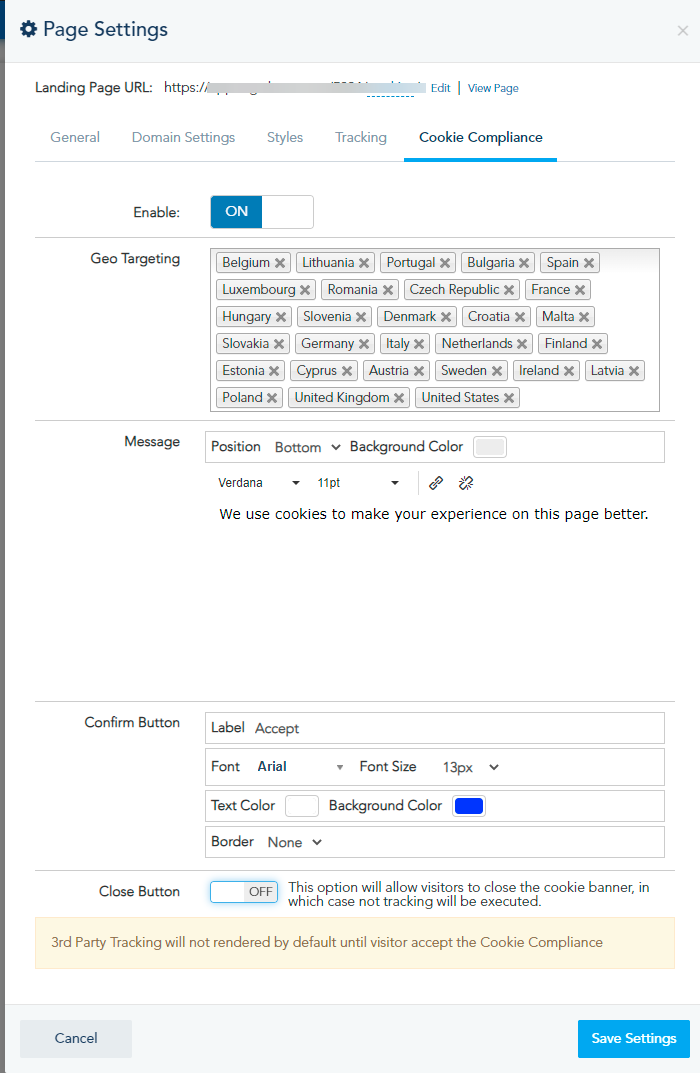
When you enable this option, you can customize the following:
-
Geo Location:
Select the countries where your visitors should see the cookie compliance.
-
Message:
Set your default message format, change its position, the background color.
Also, you can change the format of the confirm button.
The close button is turned off by default. However, if someone closes the cookie compliance, the tracking will not execute.
Please note that in case the cookie policy is not accepted, the third party tracking and the platform tracking will be disabled.